


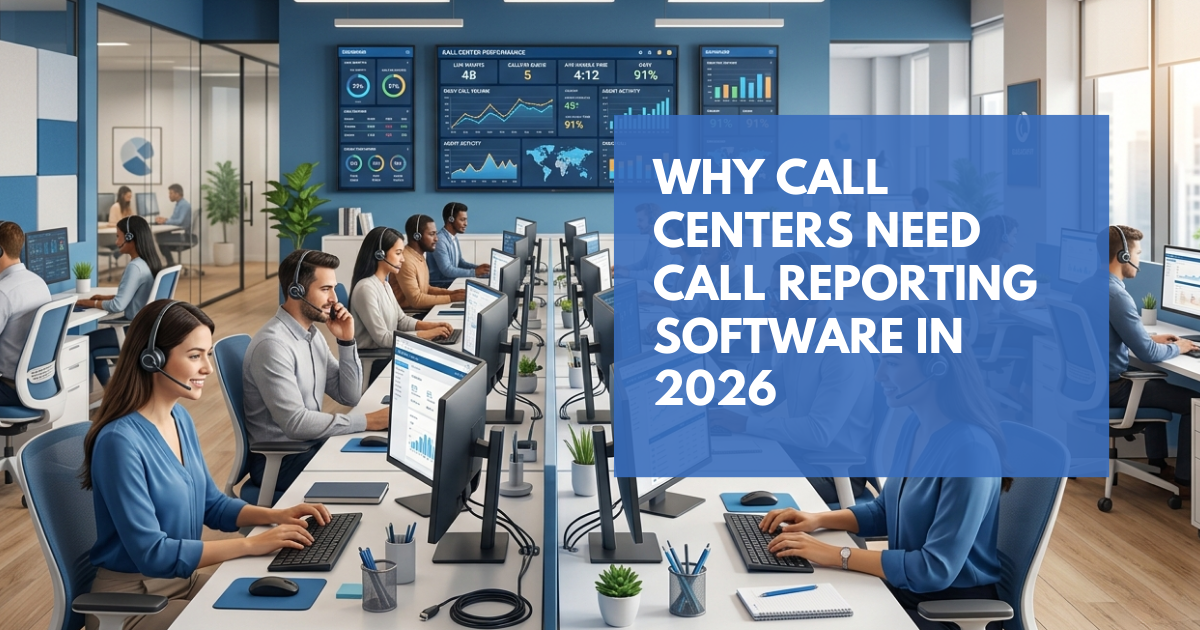
No data. No visibility. No real control. That is the reality for most call centers still running on spreadsheets and gut feeling. Call reporting software changes that – it gives managers a clear, real-time picture of everything happening across their phones, so problems get caught early instead of costing you customers.Many call centers still rely on basic reports from their phone systems. These usually show simple call logs but lack deeper insights like trend analysis, alerts, and team performance tracking. That is why many businesses now use dedicated reporting tools to get a clearer view of their call operations.Customers in 2026 are not forgiving. They want quick answers, helpful agents, and zero runaround. Drop too many calls, take too long on simple issues, or repeat the same mistakes week after week – and they leave. Usually without saying a word.This blog covers what good call analytics actually looks like, why so many teams struggle without it, which numbers are worth tracking, and what to look for when choosing a tool. A call center performance dashboard helps managers see call activity, agent performance, and service levels in one clear view.If you want a deeper look at performance metrics, here is a guide to the call center KPIs you should monitor to improve service quality and team productivity.
What Is Call Reporting?
At its core, it is a system that collects your call data and turns it into something you can act on. Think daily volumes, agent handle times, missed call counts, and team performance – pulled together in one place so you are not piecing things together from three different sources.A basic call log gives you a list. A proper reporting tool gives you a picture. Here is what it typically includes:• Live dashboards with current and historical data• Reports broken down by agent, team, time, or call type• Alerts when missed calls or long handle times spike• Scheduled reports sent to your inbox automatically• Custom views tailored per manager or departmentCloud-based tools are the standard now. You can check in on your whole operation from a laptop, phone, or tablet – no servers, no IT overhead.Why Call Centers Struggle Without Call Reporting
Most managers already know something is off. The problem is, without data, they cannot say exactly what – or where it started. These are the pain points that come up most often when call reporting is not in place:1. Missed Calls Just Slip Through
Every unanswered call is a customer you might lose. Without reporting, you have no way to know how many calls your team is dropping each day, which agents are struggling most, or when the problem peaks. Customers who cannot get through do not wait around. They call someone else.2. Coaching Is Based on Gut Feeling
If you cannot see individual call data, you end up managing on instinct and second-hand feedback. That makes it nearly impossible to coach agents fairly, reward your best performers, or spot who needs extra support before things get worse.3. Long Calls Are Eating Into Productivity
Some calls need ten minutes. Most should not. Without data, there is no way to tell whether an agent is being thorough or just slow. That difference adds up across a full day of calls and directly affects how many customers your team can actually help.4. You Are Staffing Blind
If you do not know when call volume peaks – by hour, by day, by week – you cannot plan your team around it. The result is long queues when things get busy and agents sitting idle when they do not.5. Reports Are a Chore
A lot of teams still pull data manually from spreadsheets every week. It takes hours, it introduces mistakes, and by the time the report is ready, the moment to act on it has usually passed.Key Metrics Worth Tracking
Not every number matters equally. These are the ones that actually move the needle on customer experience and team output: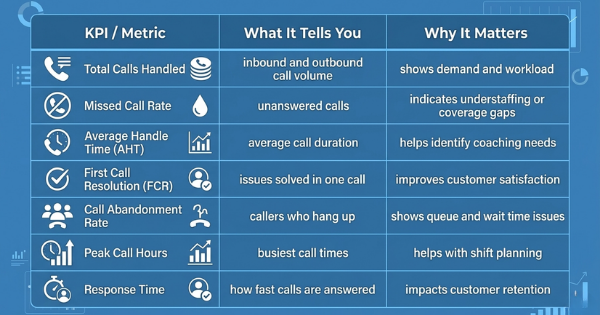 A call center performance dashboard helps managers see call activity, agent performance, and service levels in one clear view.If you want a deeper look at performance metrics, here is a guide to the call center KPIs you should monitor to improve service quality and team productivity.
Practical Tips for Getting the Most from Call Reporting Software
Picking the right platform is just the start. Here is how to get real value from day one:• Start with your biggest problem- Are calls being missed? Is one agent consistently underperforming? Start there. Let the data show you what needs attention first.• Set up your alerts first- Get missed calls and long call warnings configured before anything else. They will flag your most urgent issues straight away.• Make reporting a weekly habit- Schedule a summary to land in your inbox every Monday morning. You will start every week with a clear picture of where things stand.• Use data when you review agents- Extension and group reports give you something concrete to talk about. Specific numbers beat vague feedback every time.• Pull up the dashboard in team meetings- When everyone is looking at the same live data, it is easier to align on what matters and what to do about it.• Look for patterns, not just spikes- One bad day might be random. The same problem appearing every Tuesday morning is a pattern worth fixing.Alerts are one of the most useful features for busy teams. This guide explains how automated call alerts help managers act faster when call volumes spike or service levels drop.Benefits of Using Call Reporting Software in 2026
Get the right platform in place, and the results show up pretty quickly across the business. Here is what most teams notice first:Better Agent Performance
When agents know their calls are being tracked, things naturally tighten up. But beyond that, managers can spot who is excelling, who needs a bit of guidance, and tailor coaching to real examples – not vague impressions.Fewer Missed Calls
Set a threshold, and the system alerts you the moment your missed call rate crosses it. Managers can shift staff, adjust coverage, and get ahead of the issue before it becomes a complaint. Over time, the reporting also shows you why calls are being missed – not just that they are.Smarter Staffing Decisions
Once you know your busiest hours and days, scheduling gets a lot easier. You stop overstaffing quiet periods and understaffing rush hours. Customers wait less. Agents are not sitting around with nothing to do.Faster, Cleaner Reporting
No more pulling spreadsheets on a Friday afternoon. Reports build themselves and land in your inbox automatically – formatted, export-ready, on whatever schedule you set. What used to take a few hours takes a few seconds.Real-Time Awareness
Live dashboards mean you do not have to wait until the end of day to find out how things went. Many modern call center platforms include close to real-time dashboards and analytics that help managers monitor queues, agent activity, and service levels.Accountability at Every Level
With reports broken down by extension, team, or department, everyone in the chain – from individual agents to senior managers – has access to the data that reflects their area. That kind of visibility creates a culture of ownership.Basic Call Logs vs Proper Reporting
Most phone systems include basic call history. That is where they stop. Here is how a proper reporting tool compares: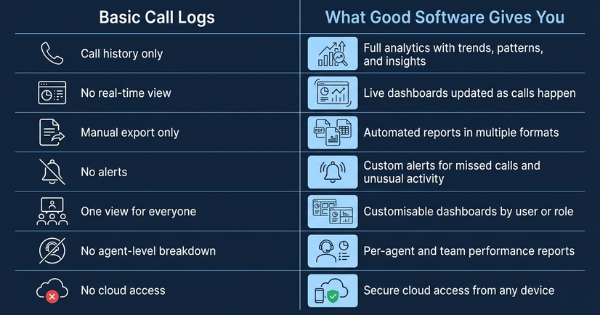
Is Call Reporting Software Worth the Investment?
It is a reasonable question. Here is a straightforward way to think about it.Every missed call has a cost. If a typical customer is worth a few hundred dollars to your business over time, and you are missing even a handful of calls each week, the revenue loss adds up faster than most people expect.Now add the cost of not knowing who on your team needs help. Performance stays flat. Customers get frustrated. Issues stay unresolved because no one can see them clearly enough to act.Call reporting software tends to pay for itself by:• Cutting down missed calls and winning back potential revenue• Helping managers coach agents based on real call data, not hunches• Saving several hours a week that would otherwise go into manual reporting• Making staffing decisions easier and more accurate• Giving leadership the confidence that comes from having reliable, up-to-date dataFor most businesses, the real question is not whether it is worth it. It is why they went so long without it.Who Benefits Most from Call Reporting?
Call reporting tools are useful for many teams that rely on phone communication.They are especially helpful for:• Call center operations teams• Customer support departments• BPO service providers• Sales teams that rely on phone outreach• Healthcare or service businesses managing high call volumesFinal Thoughts: Data Is Not Optional in 2026
Running a call center without data is risky. Customers want fast help. Competition is strong. Teams need to know what is happening in their calls.Callation provides a platform that helps call centers monitor call activity, track missed calls, and understand team performance through real-time dashboards and automated reports.Good call analytics saves time for managers. It helps agents work better and stay consistent. It also helps teams make clear decisions. If your team misses calls or performance is not clear, call reporting can help. It shows what is happening in daily call work.Frequently Asked Questions
Yes. It shows how many calls agents handle and how long calls take. Managers can see who needs help.2. Why is call reporting important for BPO providers?
Reports show busy call times. Managers can add more agents when calls are high.
Managers can see calls live. They can fix problems quickly when calls increase.
Teams can see response time, call length, and solved calls. This shows how well customers are helped.
They show clear call activity and team performance. Managers can make faster and better decisions.