
10 Signs Your Business Has Outgrown Excel and Needs Business Process Automation
Table of Contents
You built the business on spreadsheets. Everyone does.
Excel is cheap, it’s familiar, and in the early days it can cover almost anything you throw at it. Somewhere along the way, though, the same spreadsheet that got you off the ground turns into the thing slowing you down.
Reports taking longer than they used to. Two people never quite agreeing on the numbers. At that moment you’re digging through a shared drive looking for “final_v3_ACTUAL.xlsx”. If any of that sounds familiar, at least one item on this list is about you. This piece covers the signs, what business process automation actually replaces, and how custom software fits in once Excel runs out of road.
Why Excel Stops Working as Your Business Grows
Excel wasn’t built for complex business operations
Excel was built to do sums, not to run a business. There’s no workflow built in, no audit trail, and nothing stopping two people from editing the same cell at the same time.
For a five-person team tracking expenses, none of that matters much. Once you’re running multiple departments and dozens of staff, with finance, operations, and customers all touching the same process, it starts to cost you.
The wider shift toward digital tools for business isn’t optional anymore. It’s really just a question of when you make the move, not if.
The hidden cost of managing spreadsheets by hand
Every spreadsheet someone builds becomes something someone else has to maintain. Formulas break. Formats drift. Ask why a column exists and you’ll get a shrug, it’s been there three years and nobody remembers who added it.
You won’t find any of this on a budget line. It shows up as time, your team fixing things instead of doing them.
10 Signs Your Business Has Outgrown Excel (And Needs Business Process Automation)
1. Your team spends hours entering data manually
Retyping numbers from one system into another spreadsheet is a computer’s job. If staff are doing it by hand every day, you’re paying human wages for machine work.
2. Different departments use different spreadsheet versions
Sales has one version. Finance has another. Half of every meeting gets eaten up reconciling files before anyone can actually talk about the numbers.
3. Reporting takes days instead of minutes
Something that should take five minutes turns into two days of copying, checking, and reformatting, and by the time the report lands, the numbers underneath it have already moved.
4. Human errors are becoming expensive
A dragged cell reference used to be a minor annoyance you’d catch and fix. Now it’s an incorrect invoice, a missed compliance deadline, or a call made on bad data, and you don’t find out until later.
Example- For growing businesses in Sydney or Melbourne, a single data entry error in a client proposal could cost thousands in lost revenue.
5. You can’t see real-time business performance
Spreadsheets are a snapshot. If you have to ask someone to “pull the latest numbers” before you can make a call, you’re already working with old information.
6. Customers experience delays because of manual workflows
Route a customer request through three spreadsheets and two email approvals before anything actually happens, and they’ll notice the wait. So will your reputation.
7. Excel can’t integrate with your existing software
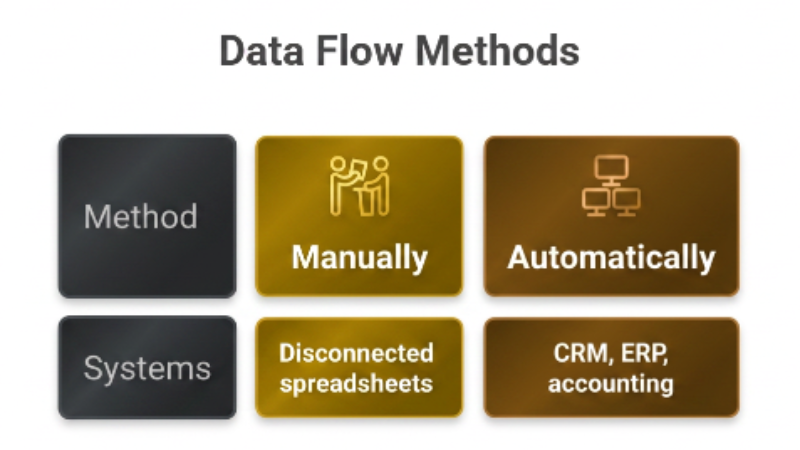
Your CRM, your accounting platform, and your operations system each hold a piece of the picture, but Excel can’t talk to any of them. Someone ends up stitching the gaps together manually.
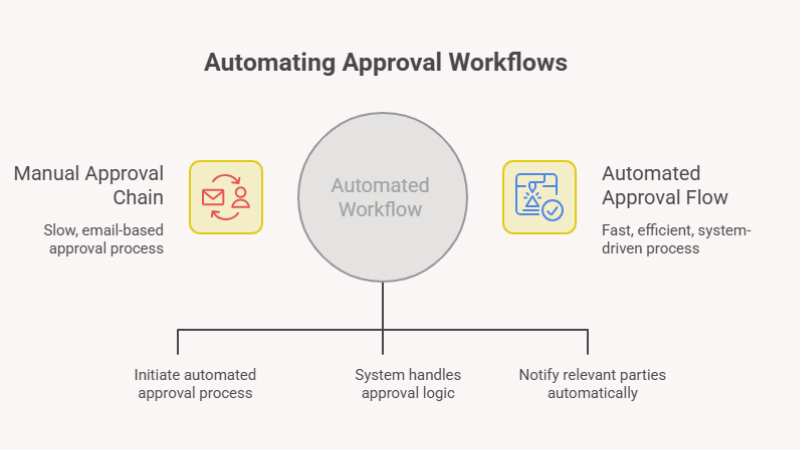
8. Approval processes happen through endless emails
“Can you approve this?” followed by three follow-ups and a phone call isn’t a process. It’s what happens when you don’t have one.
9. Security and permissions are becoming difficult to manage
Anyone with the file can open, edit, or forward it to someone outside the business, and there’s rarely a clean record of who changed what.
10. Your business growth is limited by operational bottlenecks
Eventually the spreadsheets themselves cap how fast you can grow. Of everything on this list, that’s the one worth taking seriously.
What Business Process Automation Looks Like
Automating repetitive workflows
Data entry, approvals, notifications, the manual steps that repeat every day get handed to software instead of a person. It doesn’t get tiring, and it doesn’t skip a step because it’s a Friday afternoon.
Connecting your business systems
No more exporting from one platform and importing into another by hand. Your CRM, ERP, and accounting software talk to each other directly.
Creating a single source of truth
One system. One set of numbers. The “which file is current?” The question stops being a thing people ask.
Benefits of Moving Beyond Excel
- Staff stop shuffling data between files, which frees up hours every week
- Fewer manual errors, because information isn’t retyped in five different places
- Reports come straight from the source instead of a chain of copy-paste
- A proper audit trail makes compliance easier to prove, not just easier to claim
- Decisions run on today’s numbers, not last week’s export
- The system scales with the business instead of becoming a constraint on it
How Custom Software Supports Business Process Automation
Built around your existing workflows
Off-the-shelf tools ask you to change how you work to fit the software. Custom software development goes the other way round, it’s built around how your business already operates.
Integrates with your CRM, ERP and accounting systems
Your existing platforms stay exactly where they are. Custom software just connects them, so data moves on its own instead of through a spreadsheet in the middle.
Grows alongside your business
Operations change. The system gets extended and updated to match, rather than ripped out and replaced every few years.
Is It Time to Replace Excel?
Answer honestly. Does your business have:
- Multiple people editing the same spreadsheet
- Frequent formula errors
- Time-consuming reporting
- Repetitive manual work
- Poor visibility across teams
Three or more? You’re likely ready to move on.
Why Australian Businesses Choose Basecode
Basecode is a custom software development company working with businesses across Sydney, Melbourne, Perth, the Gold Coast, and Adelaide.
We build custom business software rather than selling one-size-fits-all SaaS subscriptions, so what you get is designed around your actual processes, not a generic template. As a bespoke software development company, we handle everything from custom web application development to enterprise custom software development, with a local team and long-term support once the system is live.
Ready to Move Beyond Excel?
If three or more of the signs above sound familiar, your spreadsheets have probably told you everything you need to know.
Get a Free 15-Minute Operational Bottleneck Audit with Basecode.

FAQs
1. Can Excel still be used alongside automation software?
Yes, and most businesses do. It just stops being the system that runs core operations and goes back to being what it’s actually good at, quick one-off analysis.
2. When should a business replace Excel?
Once manual work, version confusion, or reporting delays start costing more time than a proper system would take to run.
3. What processes can be automated?
Data entry, approvals, invoicing, reporting, customer onboarding. Most repetitive workflows currently held together by spreadsheets and email chains are fair game.
4. Is custom software better than buying another SaaS tool?
Depends on the business. SaaS is quick to set up but rarely fits every process, and custom software takes longer to build but fits your operations exactly, without you bending the business around someone else’s software.
5. How long does business process automation take?
Varies with scope. Most custom projects move from discovery to a working system within a few months, not years.