
Why Traditional Automation Breaks: Moving to AI Agent Workflows
Table of Contents
You built the automation. You followed the rules. You connected the tools. And it still falls apart every time something unexpected happens.
That frustration is not unique to you. Businesses across every sector are hitting the same wall: traditional automation handles exactly what it was built for, and nothing else. The moment a workflow meets a real-world edge case, the whole thing stalls.
AI agent workflows are changing that. Not with hype. With actual decision intelligence baked into the process.
Why Does Traditional Automation Fail When It Matters Most?
Traditional automation, including robotic process automation (RPA), runs on a simple principle: if this, then that. Define every step. Map every rule. Handle every exception manually.
That holds up fine until your data changes format, your API goes down, or a customer submits something outside the script.
When any of those happen:
- A broken trigger halts the entire pipeline
- Your team spends hours tracing where the rule failed
- Every new exception needs a developer to rewrite logic
RPA was never built for ambiguity. It was built for repetition. Business workflows are rarely that clean.
Action: Audit your current automations. Any process that needs regular human fixes is a candidate for AI-driven replacement.
Where Does RPA vs Agentic AI Actually Differ?
RPA follows a fixed path. Agentic AI picks its own. That sounds like a small distinction. It is not. An AI agent workflow does not just execute steps; it reads context, weighs options, and decides what comes next. It uses error-handling logic to recover without waiting for a human to intervene.
Take a document intake process. RPA stops cold if a form field is missing. An AI agent notices the gap, checks other available data, fills what it can, and flags only what genuinely needs a person. That is human-in-the-loop validation working as it should.
Beyond that, agentic AI connects across your full API integration ecosystem, pulling from CRMs, databases, and external services without needing a separate workaround for each.
Action: Find where your RPA needs the most manual intervention. Those are your first candidates for agentic replacement. For a deeper look at why clean data comes before any of this, see our pillar guide on Why Data Integration Is the Mandatory First Step Before Adopting AI.
How Do AI Agents Handle Complex Business Workflows Without Breaking?
The answer is adaptability at the decision layer.
When automating complex business workflows, the simple steps are rarely the problem. It is the branching paths of the “what if” moments that no rulebook fully covers.
AI agents handle this in three specific ways:
- They read the situation, not just the input – context shapes the decision, not just the data point
- They find another route when one is blocked – a failed path triggers a recovery, not a halt
- They get better as decisions repeat – patterns from past runs inform the next one
So a customer service escalation does not stall because a ticket was miscategorised. The agent reads the content, routes it correctly, and logs what it did. If you are working on improving customer service through automation, this is exactly where custom AI development earns its cost.
Hyperautomation layering AI, RPA, and machine learning together only works reliably when your AI agent can handle decision points on its own.
Action: Map your three most complex workflows. Mark every point where a human currently steps in. That list is your AI agent implementation roadmap.
Why Are Businesses Still Stuck With Broken Automation in 2026?
Because nobody wants to throw away two years of automation work. Most businesses have sunk real money into RPA. Scrapping it feels irresponsible. So they patch it, add another rule, and quietly assign someone to watch it fail. The system stays broken. The team gets better at managing the breaks.
The real cost is less visible. A delayed report here, a missed escalation there, a developer spending Thursday afternoon debugging a trigger instead of building something useful. It adds up faster than the licensing fee ever did.
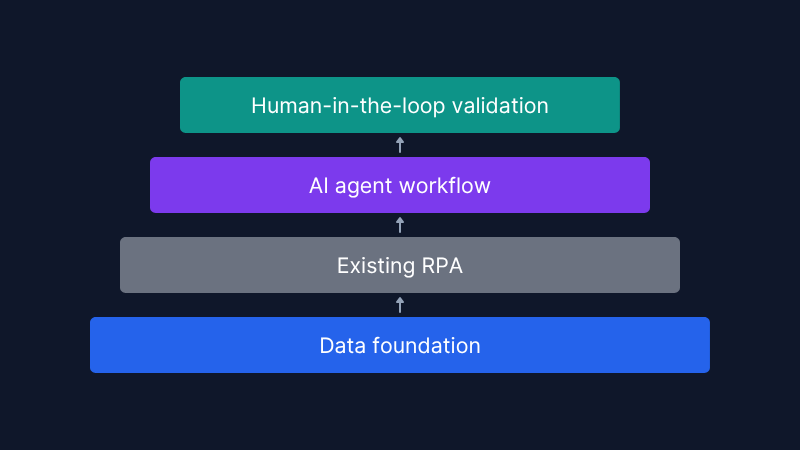
The smarter path is not wholesale replacement. You layer AI agents on top of what you already have, filling the gaps that rule-based tools cannot handle. Custom AI software development, built around your specific workflows, makes that practical without a full rebuild.
You keep the pipes. You replace the brain.
Action: Find the automations that fail most often or cost the most staff time to manage. Start your AI agent build there.
How Do You Start Building a Reliable AI Agent Workflow?
Start with the data, not the automation. An AI agent is only as good as what it can read. If your data is siloed, inconsistent, or unstructured, the agent will make poor decisions confidently. That is worse than a broken RPA.
Once your data foundation is solid, work through these questions before you write a single line of agent logic:
- Where does the workflow need to reason rather than execute?
- What does a correct outcome look like and who signs off on it?
- Which decisions are high-stakes enough to need a human review before the agent acts?
- How will you feed corrections back in so the agent improves over time?
That last point trips up more teams than you would expect. An AI agent workflow does not get better on its own. It gets better because someone notices what went wrong and closes the loop.
Predictive analytics can run alongside your agent to catch risks before they become failures, especially useful in finance and operations – our upcoming piece on How Predictive Analytics Changes Financial Business Decisions covers the specifics.
Action: Before you build anything, document every decision point in your target workflow. That document is your AI agent brief.
If you are ready to stop patching broken automations and start building workflows that actually hold up, the conversation starts with your data and your decision points; we can help you work through both.

FAQs
1. Is AI agent automation only for large enterprises?
Not at all. Plenty of startups and mid-sized service businesses are already running AI agent workflows. The cost of building something focused and custom has dropped considerably over the last two years.
2. Will AI agents replace my team?
No. They take on the repetitive, rules-based work that should not need a person anyway. Your team moves to reviewing decisions, handling real exceptions, and doing the work that needs actual judgement.
3. How long does it take to replace a broken automation with an AI agent?
For a single, well-scoped workflow, four to twelve weeks is realistic. The businesses that struggle are the ones that try to automate everything at once. Pick one painful process and prove it there first.
4. Do AI agents work with my existing tools?
In most cases, yes. A well-built AI agent connects through your existing systems; your CRM, ERP, or support platform typically does not need to change. The agent works around what is already there.
5. What if the AI agent makes a wrong decision?
That is what human-in-the-loop validation handles. You set a confidence threshold, say, 85%, and anything below it goes to a person first. The agent flags it, the human decides, and that decision feeds back in. The grey areas shrink over a few months.