Is It Cheaper to Build or Buy Software? A Cost Comparison for CEOs
Table of Contents
You’ve had this meeting before. One department wants a new SaaS subscription. Another wants to build something custom in-house. Everyone turns to you for the final call, and the spreadsheet in front of you doesn’t actually answer the question.
That’s because the build vs buy software decision was never really about the sticker price. It’s about total cost of ownership, speed to value, and which option protects your margins three years from now. Get this wrong and the wrong operating model sticks around a lot longer than the budget line that caused it.
Here’s how to work through it properly.
Why Excel Stops Working as Your Business Grows
Excel wasn’t built for complex business operations
Excel was built to do sums, not to run a business. There’s no workflow built in, no audit trail, and nothing stopping two people from editing the same cell at the same time.
For a five-person team tracking expenses, none of that matters much. Once you’re running multiple departments and dozens of staff, with finance, operations, and customers all touching the same process, it starts to cost you.
The wider shift toward digital tools for business isn’t optional anymore. It’s really just a question of when you make the move, not if.
Understanding Total Cost of Ownership (TCO)
Upfront Licensing vs. Initial Software Development
A SaaS platform charges you a licence fee, usually per seat, per month. A custom build charges you a development cost, paid once, for architecture design, and the working product. On paper, licensing wins for cash flow. Over five years, that math often flips.
Hidden “Iceberg” Costs of Building In-House
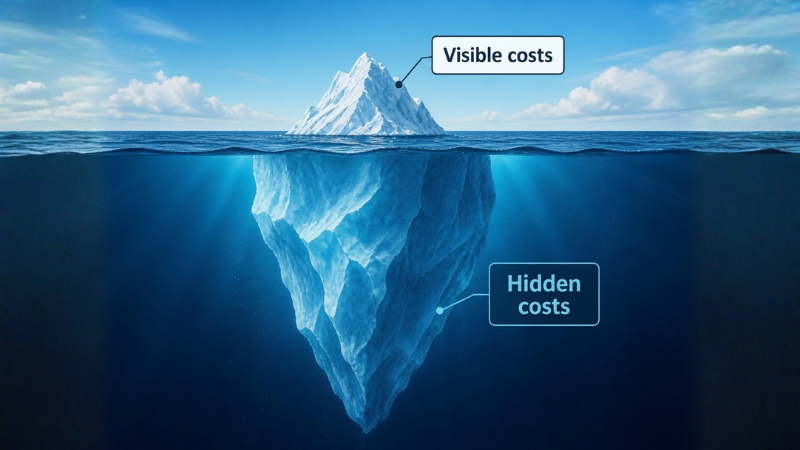
The build quote you get rarely includes everything you’ll actually pay for.
- DevOps, QA testing, and architecture design. Someone has to test the software, deploy it safely, and design it so it doesn’t collapse under its own weight in year two.
- Ongoing bug fixes, maintenance, and security patches. Software isn’t a one-off purchase. It needs upkeep for as long as you use it, and that upkeep is a permanent line item, not a project cost.
Then there’s developer turnover. When the engineer who built your system leaves, someone else has to learn the codebase before they can safely touch it, and nobody puts that onboarding time in the original budget.
The Hidden “Iceberg” Costs of Buying SaaS
Buying has its own iceberg, and it’s just as easy to miss.
- Per-user seat scalability traps. A tool that costs very little at 10 users can cost a lot more at 200, and most contracts aren’t built to reward you for growing.
- Vendor price hikes and contract renewals. Once your team depends on a platform, the vendor knows switching is painful. Renewal pricing tends to reflect that.
And integration always costs more than the quote implies. Off-the-shelf tools rarely fit your existing stack out of the box, so you end up paying someone, in-house or contracted, to make the pieces talk to each other.
Speed to Market vs. Strategic Advantage
The Opportunity Cost of Delayed Deployment
A six-month custom build means six months where a competitor with an off-the-shelf tool is already live, already collecting data, already ahead. That delay has a cost, even if it never appears on an invoice.
When Custom Features Drive Competitive Differentiation
If the software touches your core product, or the thing customers actually pay you for, off-the-shelf rarely cuts it. A logistics company built on the same fleet management platform as every competitor has no edge. A logistics company with custom routing logic does.
Off-the-Shelf Efficiency: Capitalising on Proven Market Solutions
For support functions like payroll, ticketing, or basic CRM, a proven SaaS platform gets you running in weeks, not months. You’re not trying to win on payroll software. Buy it, and put your engineering budget where it actually matters.
Risk Management, Security & Technical Debt
Every option here carries risk. The mistake is assuming buying is the safe choice and building is the risky one. It’s rarely that simple.
Vendor Lock-in & Solvency Risks (Buying)
Your data, your workflows, and your team’s habits all end up shaped around someone else’s platform. If that vendor gets acquired, changes direction, or shuts down, you inherit the disruption on their timeline, not yours.
Accumulating Technical Debt & Legacy Code Constraints (Building)
Custom software ages the way any codebase does. Without ongoing investment, the shortcuts taken to hit an early deadline turn into the reason a new feature takes three times longer than it should. Technical debt in custom software is a cost you manage, not one you ever fully pay off.
Compliance, Data Sovereignty, and Enterprise Governance
Healthcare and finance businesses in particular need to know exactly where data sits and who can access it. A custom build gives you full control over data sovereignty. A SaaS vendor may store your data offshore, which matters a great deal under Australian privacy obligations.
The 5-Point CEO Decision Framework
Five questions. Answer them honestly, and the decision mostly makes itself.
1. Is the Software Your Core Product or Support Infrastructure?
If it’s core to your competitive advantage, lean toward building. If it’s a back-office function, lean toward buying.
2. What Is Your Internal Engineering Team’s Capacity?
Building without the internal capacity to maintain it just delays the same vendor dependency you were trying to avoid, except now your own team is footing the bill for it.
3. How Fast Do You Need ROI?
If you need a working solution in the next quarter, buying wins by default. Custom software development pays off over a longer horizon.
4. What Is Your 3-to-5 Year Growth Strategy?
A tool that fits your business today at 50 staff may not fit at 500. Model your TCO against where the business is heading, not where it stands now.
5. Hybrid Approach: Can You “Buy the Foundation and Build the Edge”?
Most CEOs don’t need a pure answer. Buy the commodity infrastructure, CRM, payroll, ticketing, and build the custom layer that actually differentiates you. This is how most mid-sized Australian businesses, from Sydney to Perth, land the decision in practice.
Financial Comparison Matrix
Build | Buy | |
|---|---|---|
Cost structure | One-time Capex, ongoing maintenance Opex | Recurring Opex, per-seat |
Scaling costs | Flat once built, more users cost little extra | Rises with every seat added |
Asset ownership | Depreciable asset, owned outright | No asset, licence only |
Flexibility | Full control of roadmap | Limited to vendor’s roadmap |
How to Make the Most Cost-Effective Choice
When Building Delivers Higher Long-Term ROI
Building wins when the software is core to your product, your growth plan spans years, not months, and you have the internal capacity, or a reliable custom software development partner, to maintain it.
When Buying Protects Your Bottom Line
Buying is the safer bet when the function is a commodity, speed matters more than differentiation, or your team genuinely can’t support in-house maintenance yet. There’s no shame in that. Plenty of well-run businesses buy their way through the boring parts of the tech stack on purpose.
Conducting Your Internal Software Audit
Before your next budget cycle, list every piece of software your business depends on. Mark each one as core or commodity. For the core systems, run the TCO numbers over five years, not one.
Most CEOs skip this and go with gut feel instead. Not because the exercise is hard, but because it forces an honest look at software everyone’s quietly annoyed with, and nobody wants to own the cost of replacing.
Talk to our experts if you’d like a second set of eyes on your build vs buy numbers before you commit either way.
FAQs
1. Is custom software always more expensive than SaaS?
Not over the long run. SaaS is usually cheaper upfront and more expensive over three to five years once seat costs and renewals are factored in.
2. How do I calculate total cost of ownership for software?
Add licensing or build costs to maintenance, integration, staff time, and scaling costs over a three- to five-year window, then compare the totals, not just the entry price.
3. Is buying SaaS riskier than building custom software?
Depends which risk you’d rather manage. Buying exposes you to vendor lock-in and price hikes; building exposes you to technical debt and ongoing maintenance. The risk doesn’t go away either way; it just moves to a different line on your budget.
4. Can a business do both build and buy at once?
Yes, and most do. Buying commodity tools while building the custom layer that differentiates your business is the most common approach among growing companies.
5. When should a CEO involve a custom software development company in this decision?
Bring one in before you commit to either path. An experienced custom software development partner can model your TCO and flag hidden costs a vendor quote or an internal estimate won’t show you.