
Generative AI for Corporate Reporting: Stop Making Decisions on Last Week's Data
Table of Contents
Here is something nobody says out loud in board meetings: half the decisions on that table are made on data that is already a week old. The dashboards look impressive. The slide decks are polished. But ask a sharp question, “Why did the margin drop in the North last quarter?” and watch what happens. Someone says they’ll look into it. The answer arrives two days later, in an email, formatted for the last meeting.
That is the gap. And generative AI for corporate reporting closes it in a way that quarterly BI reviews simply cannot.
Why Most Enterprise Reporting Is Already Broken
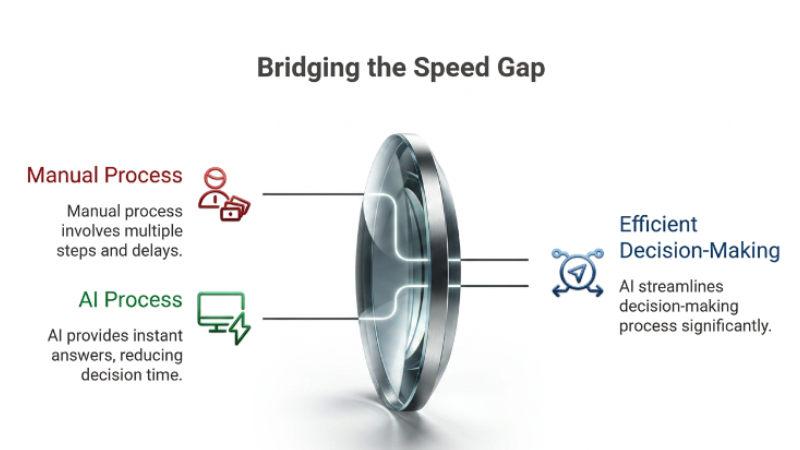
The standard cycle goes like this: an analyst pulls the data, formats it, writes the commentary, gets it reviewed, and then sends it round. By the time the report lands, the business has moved on.
Nobody designed this process to be slow. It just ended up that way because each step made sense in isolation.
The problem is what it costs you:
- Decisions get made on last week’s numbers, not what is happening now
- Analysts burn most of their time on formatting work, not the analysis that actually matters
- Follow-up questions, the ones that come out of every exec meeting, take another 48 hours to answer
The labour cost is real. But the higher cost is the decisions that get delayed, or made badly, because nobody had the right information at the right moment.
Reducing manual reporting workflows is not just a time-saving exercise. It changes the quality of decisions your leadership team can make.
How Generative AI for Corporate Reporting Actually Works in Practice
You have probably heard vendors talk about this. Here is what it actually looks like when it works.
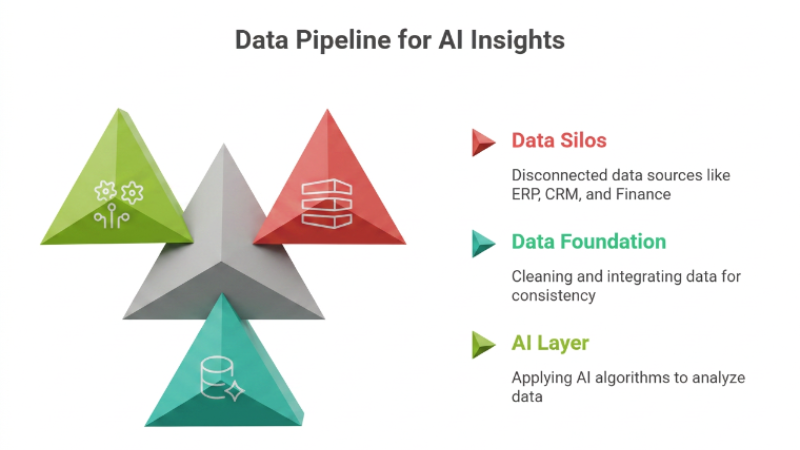
AI-powered automated enterprise reporting tools connect to your existing data sources, your ERP, CRM, finance system, and operational databases. They sit across all of that continuously, rather than pulling a snapshot once a week.
When your CFO types: “What drove the margin drop in the North region last quarter?” the system queries your data, runs the analysis, and hands back a clear, sourced answer. Not a dashboard link. Not a ticket to an analyst. An answer.
That is natural language querying for business data in practice. No SQL. No waiting around.
One thing worth knowing: this only works when your data pipelines are in order before you build the AI layer on top. If you are skipping that step, read why data integration is the mandatory first step before adopting AI first; it will save you a painful rollout. This is what a well-built system looks like. If you want to see how we approach building it from scratch, here is how our custom AI development works.
What Has to Be Right Before You Go Near an AI Reporting Tool
Most businesses that struggle with this do the same thing. They buy the AI layer, connect it to their existing data mess, and wonder why the outputs are unreliable.
Optimising your internal data pipelines with AI delivers real value when the data going in is accurate and consistent. If your customer records live across three systems with different field names, no AI tool will give you trustworthy answers. It will give you confident-sounding ones, which is worse.
Before you deploy:
- Get to one source of truth for each core data type: customers, revenue, operational metrics
- Set up automated data validation so errors get caught upstream, not in the boardroom
- Standardise how your departments define things. “Revenue” in sales and finance should mean the same number
Once those pipelines are clean, the AI layer works properly. Without it, you are automating bad data faster. That is not progress.
Why AI-Driven Business Insights Need to Reach the Right Person, Not Just Exist
Generating an insight and delivering it at the right moment to the right person are two completely different problems. Most businesses solve the first one and ignore the second.
The better implementations push insights out proactively. Your regional sales lead gets a morning flag: revenue is 12% below forecast, here are the three accounts driving it. Your operations head gets a notification when a supplier’s lead times start drifting before it becomes a fulfillment problem that reaches the customer.
AI-driven business insights land best when they are filtered by role. A CEO needs different signals than a logistics manager. Well-built systems let you configure those layers without needing a developer every time something changes.
For a closer look at how role-based delivery actually gets configured, see using generative AI to optimise internal business reporting.
What Changes for Your Exec Team When This Is Running
The practical shift is less dramatic than the sales pitch suggests, but more useful than most people expect.
Executives stop waiting for answers. When your CFO can query the data directly in plain English, they do. They ask better questions because the friction is gone. The weekly ops review stops being a catch-up on last week and starts being a conversation about what to do next.
Your analysts change roles, too. The hours they spent pulling, formatting, and distributing routine reports go towards interpretation and strategy work. That is a better use of people who actually understand the business.
The early warning piece is the part that surprises people most. Anomalies surface before they become crises, not because someone was monitoring, but because the system flags them automatically.
If you want to see what comes after this, using the same data foundation to forecast rather than just describe how predictive analytics changes financial business decisions is worth reading next.
How to Start Without Touching Everything at Once
Start with the reporting workflow that causes the most pain right now. Monthly board packs, weekly sales performance, operational KPI summaries, pick the one that your team complains about most, or the one where decisions most often get delayed.
Map it out: who touches it, how many steps there are, where errors usually come from. Then build a narrow proof of concept using a generative AI layer on one clean data source. Measure how much time it saves and whether the outputs are actually reliable.
The businesses that get real returns from this do not start with a company-wide rollout. They start with the most painful workflow, prove it works, and let the results do the selling internally.
That is how the scope grows from evidence, not enthusiasm. If you want to work out what this looks like for your business, our tech consulting team can scope the right starting point with you.

FAQs
1. Is generative AI for corporate reporting only worth it for large enterprises?
Not really. Mid-sized businesses and startups often get more out of it because they have fewer legacy systems to untangle. Company size matters less than data quality.
2. How quickly can we expect to see results?
A focused pilot on one reporting workflow can show clear time savings within four to six weeks. Broader rollout takes longer, but you do not have to do it all at once, and you should not.
3. Does this mean we no longer need data analysts?
No. It removes the repetitive end of their work, pulling data, formatting reports, and distributing outputs. Analysts then spend that time on the work that actually requires judgment: interpreting findings, spotting what the AI flags but cannot explain, and advising on what to do next.
4. Our data is scattered across old systems. Is that a problem?
Yes, and it is better to know that upfront. AI reporting tools surface whatever is in your pipelines. If the data is messy, the outputs will be too. Fix integration first. Our piece on why data integration is the mandatory first step before adopting AI explains how to work through that.
5. How do we stop AI-generated reports from containing errors?
Build validation into your data pipeline, not at the reporting layer. Run periodic audits against known figures. Keep human review in place for anything that goes to the board. Accuracy is an ongoing process, not something you configure once.