
How to Connect Your Legacy CRM to a Modern Node.js API
Table of Contents

A lot of Australian businesses are still running CRM systems built a decade ago. They work technically. But they weren’t designed to connect to mobile apps, sync with cloud tools, or do anything in real time.
That gap creates real problems. Staff enter the same data in two places. Updates lag. Customers call about things that should already be fixed. The system isn’t broken, it’s just isolated.
Connecting your legacy CRM to a Node.js API solves that without forcing you to replace everything.
What Makes Legacy CRMs Frustrating
If you’ve worked with one, this list will be familiar:
- Data locked in silos with no easy way to share it
- Manual work that should have been automated years ago
- No integration with the modern tools your team uses
- A system that struggles to scale as the business grows
- An interface slow enough to make people dread using it
For businesses in Melbourne and across Australia, this isn’t just an IT problem , it shows up in customer experience and in how long it takes to get things done.
Why Node.js Works Well Here
Node.js has become a common choice for API integration services because of how it’s built. Its non-blocking architecture handles multiple requests at once without grinding to a halt. It syncs data in real time. It works well with cloud platforms and plays nicely with REST and GraphQL.
It’s not magic. But for legacy CRM integration in Australia, it’s a practical fit especially when you need something that handles real-time data without a full rewrite of your existing system.
The Architecture
The setup looks like this:
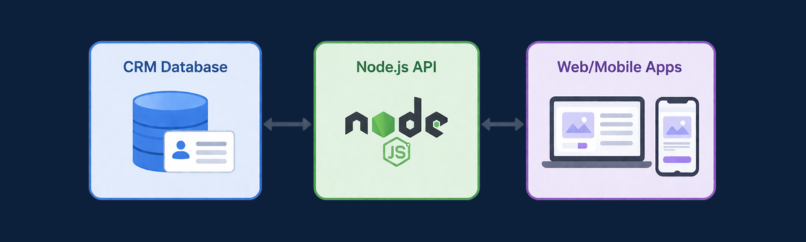
The Node.js layer sits in the middle. It pulls data from your CRM, converts it to JSON, and sends it wherever it’s needed. When something updates in your app, it pushes that change back to the CRM. Your existing system stays in place, it just finally has a way to talk to everything else.
How to Actually Build It
1. Audit Your CRM First
Find out what you’re working with before writing a line of code:
- Does your CRM expose an API?
- Can you access its database directly?
- What formats does it use – XML, CSV, something else?
Some older systems need custom connectors. This step tells you how much extra work is ahead.
2. Be Clear About What You’re Trying to Do
Are you syncing data in real time? Feeding a mobile app? Automating a workflow that currently involves copy-pasting between tabs? The goal shapes everything else, so don’t skip this.
3. Build the Middleware Layer
This is where the Node.js API development actually happens. The middleware accepts requests from modern apps, connects to your CRM, transforms the data, and returns a clean response. Express.js is a common framework, it’s fast to develop with and keeps the codebase readable.
4. Choose REST or GraphQL
Both work. REST is simpler and widely used, good for standard data operations. GraphQL is more flexible and lets the client request only what it needs. If you’re starting fresh and not sure, REST is usually the right call.
5. Handle Data Transformation Properly
Old CRMs often store data in formats that modern apps don’t understand. Your API needs to:
- Convert data to JSON
- Clean and validate it
- Standardise field names so nothing breaks downstream
This step gets skipped or rushed. It causes problems later.
6. Lock Down Security
You’re moving customer data. This isn’t optional:
- OAuth 2.0 for authentication
- API keys for service access
- JWT for secure sessions
- HTTPS across the board
7. Build in Error Handling
The API will fail sometimes. What matters is how it fails. Set up proper error handling, logging, and monitoring, so when something breaks, you find out through your dashboard, not through a customer complaint.
8. Test It Properly
Unit tests, endpoint tests, data validation, realistic usage scenarios. Don’t skip this to save time. You’ll spend more time fixing production issues than you saved.
9. Deploy and Keep Watching
Push to a cloud platform and monitor response times, error rates, and overall performance. Set up alerts. Systems drift over time.
What Businesses Actually Get Out of This
- Less time spent on manual data work
- Decisions based on current information instead of yesterday’s export
- Customer-facing staff working from accurate records
- A system that can connect to new tools without a full rebuild
- Lower long-term maintenance costs
Mistakes That Come Up Repeatedly
- Skipping the CRM audit and hitting surprises mid-build
- Leaving security until late in the project
- Over-engineering the API when something simpler would work
- Not thinking about scale until traffic breaks things
- Rushing through testing to hit a deadline
Why This Matters for Melbourne Businesses Specifically
Melbourne’s tech sector has grown fast, and more businesses are investing in custom software development and connected systems. Companies still running on disconnected legacy tools move slower, slower to respond to customers, slower to scale, slower to fix things when they go wrong.
A Node.js API integration doesn’t require replacing your CRM. It’s the layer that makes your existing system useful in a modern environment.
Working with Basecode
Basecode helps Australian businesses with API integration services, Node.js application development, and cloud architecture. If your CRM is slowing things down, the practical first step is usually a conversation about what integration would actually look like for your system.

FAQs
1. Can any legacy CRM connect to Node.js?
Most can. The method API, middleware, direct database depends on what your CRM supports.
2. How long does it take?
A few weeks to a few months. Complexity determines the timeline.
3. Is Node.js secure for customer data?
Yes, with proper authentication, encryption, and access controls.
4. What does it cost in Australia?
It varies. Upfront cost is usually offset by reduced operational overhead over time.
5. Do I need to replace my CRM?
No. Integration extends what you already have.